

What happens to Facebook and Instagram accounts when the owner dies?
Until Meta becomes aware of your passing, your accounts will carry on like normal, though it does give you the option to plan ahead.

Your Facebook or Instagram account isn't simply going to disappear when you die. Well, the account can just carry on looking pretty much as it did before if nobody reports the death, along with the occasional Facebook birthday reminder most people aren't going to be psyched about. But once Meta is aware of the death, it can delete the account or even "memorialize" it, depending on what the owner wants and the request Meta receives.
If an account is memorialized, Meta will add a "Remembering" tag next to the person's name while keeping their posts, photos and videos intact for everyone who was able to view them before. Facebook also removes memorialized profiles from friend suggestions and birthday reminders. And while Instagram hides them from Explore, neither platform lets anyone log into a memorialized account, even if they're family.
If relatives want to save photos, recover chats or look after the profile once their loved one is gone, that's not going to be easy. Even if you're next of kin to the deceased, you're not going to get direct access to someone's private messages. It's neat that as a user you get to plan ahead, but neither platform lets whoever is left managing the account do too much with it.
Facebook's legacy contact doesn't get the password
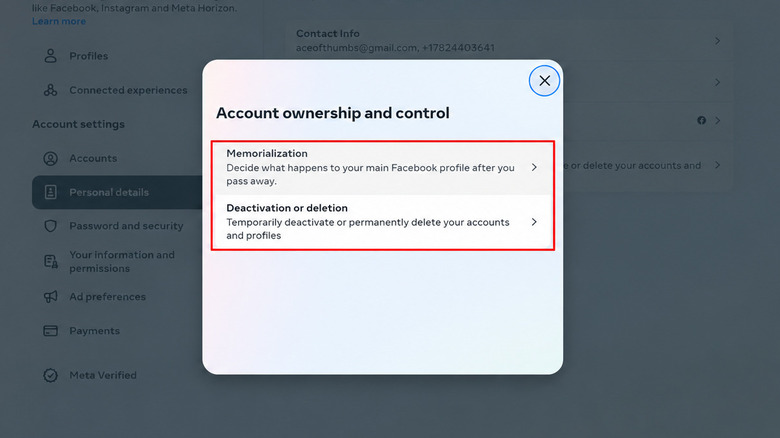
As an adult user, Facebook will let you set up a legacy contact from your friends to manage the main profile after it has been memorialized. The person you appoint can pin a post (like a post about details of a memorial service), edit the profile and cover photos, accept incoming friend requests or even request removing the account. There's also a feature to download a copy of shared content, as long as the owner has enabled that option earlier.
Although the name "legacy contact" does seem like an official-sounding title, it has restricted powers. Think of it more as a caretaker than a second user, since a legacy contact can't log in, view private messages, remove friends or even send new friend requests.
All of these options are in Accounts Center, under Profiles and personal details > Account ownership and control > Memorialization. There's the option to either appoint a contact or choose "Delete after death," at which point Meta will remove the account once it has proof of death. Now while the legacy contact can only manage the main profile, using the deletion option also applies to additional Facebook profiles.
If someone doesn't have a designated contact, there's still the option for friends or family to request memorialization as long as they have appropriate documentation to back it. But despite all of these concessions, there is no way for anyone to edit the deceased's memorialized profile later on without a legacy contact. Facebook does warn that a Page can be taken down or a Group paused if its sole administrator's profile is memorialized after a valid request.
Instagram has a plan for your account too
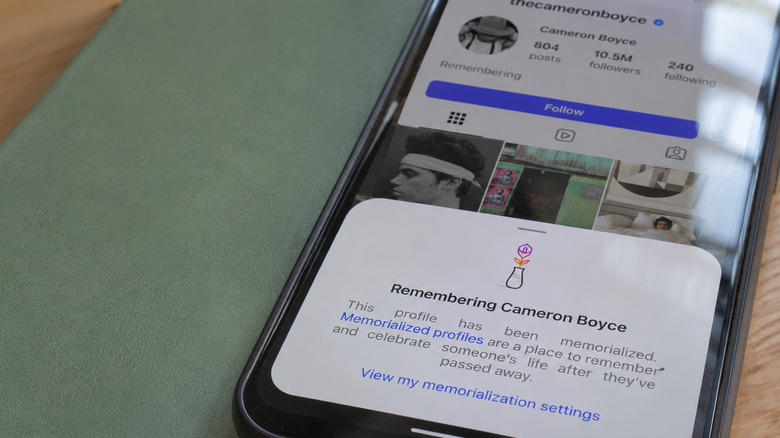
Instagram goes down the same path with the option for legacy contacts and a "Delete after death" setting, even if some of the older guides suggest otherwise. The legacy contact can update the profile picture, manage tags and even download shared content if the owner has previously allowed it. As it is with Facebook, creating new posts, reading direct messages or "sliding into the DMs" of people from the deceased's profile is strictly off-limits.
To get an Instagram account memorialized, somebody first needs to report the death and back it with supporting evidence, like an obituary. Now, permanent deletion is where more paperwork is needed, as Meta may ask for substantial proof such as a death certificate. As a requester, you'd also need to prove that you're an immediate family member of the deceased or have the legal authority to do it.
Since memorialized profiles retain their existing posts and privacy settings, a private account won't automatically become a public profile. Meta doesn't specify how long either of these requests takes.