

You can finally see who's talking in voice chat on PlayStation 5 — here's how
An update makes busy PS5 parties easier to follow, provided you know where to find the new toggle.
For years, figuring out who's speaking in a large PlayStation 5 party chat without opening the voice chat card has been a guessing game. Thankfully, the September 16, 2026 PS5 system software update (version 26.06-14.00.00) added an on-screen indicator to display the name of each player who's currently talking.
The September update also enabled enhanced PSSR upscaling by default on PS5 Pro, but the speaker indicator works on both the regular PS5 and PS5 Pro. You can also choose where it appears on-screen, though you'll have to turn it on first since it's not enabled by default. Also, if you used this option prior to September, you weren't imagining it!
How to use Display Who's Speaking on PS5
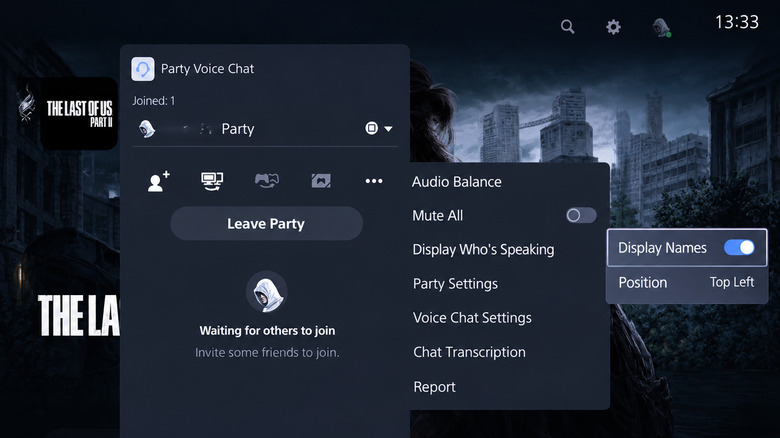
First, you'll need to create or join a PlayStation party for voice chat. To make one, open Control Center by pressing the PS button. Then go to Game Base > Parties > Start Party and choose Open Party or Closed Party to control who can join. While in the voice chat, open Control Center again and go to the Voice Chat card. There, select the three-dot More button, then Display Who's Speaking. Turn on Display Names, and the name of the person talking will show on your screen.
You can also control the Position of this indicator so it doesn't cover important game elements like your mini-map or health bar. To hide the speaker indicator, just turn off Display Names in the same way. If you can't find the setting, go to Settings > System > System Software > System Software Update and Settings and select Update System Software to make sure you're on the latest version.
PlayStation parties can contain as many as 16 players, so identifying the person with the incredibly loud mic can be difficult. After you figure out who's responsible, select their name in the Voice Chat card and choose Volume to control their individual volume. That setting carries over to other chats with that player, so you don't have to adjust it every time you game with them.
Why some PS5 players already had this feature
The release of Display Who's Speaking in September was not the first time you could take advantage of this feature. In fact, some players reported using it as early as November 2025, and shared screenshots of the setting, while others didn't see it. A few folks even reported that they lost access to this feature after initially receiving it. Since Sony has not stated how the early availability was controlled, the September 16 update marked its official inclusion in the public release notes, rather than the first time anyone could use it.
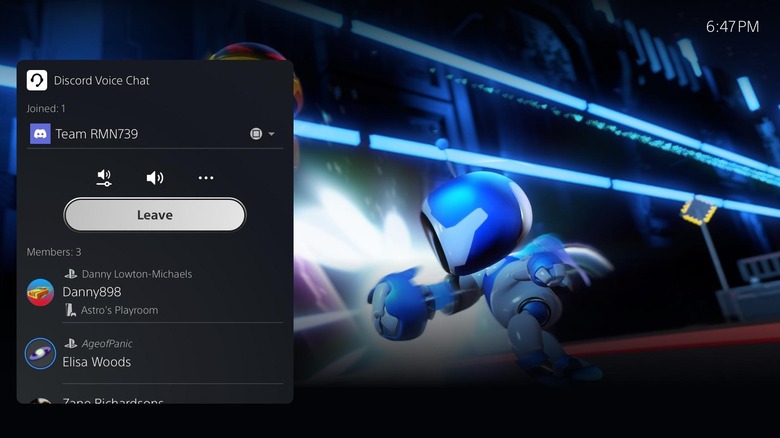
While Sony documents the indicator specifically for PlayStation party chat, some players have reported using the indicator with Discord on their PS5 in the same way. The feature doesn't work with the voice chat built into games, though many titles have their own options for displaying speakers, so check their settings if this is something you want for game chat.
It's great to see this feature built into the PS5, though customization is limited. There are no settings to tweak the speaker display's transparency or size. Xbox's comparable party overlay can be adjusted for both position and transparency, which was announced all the way back in May 2017.