

What is a cold wallet and how does it work?
In the cryptocurrency Wild West, sometimes hardware can provide peace of mind when securing your private keys.
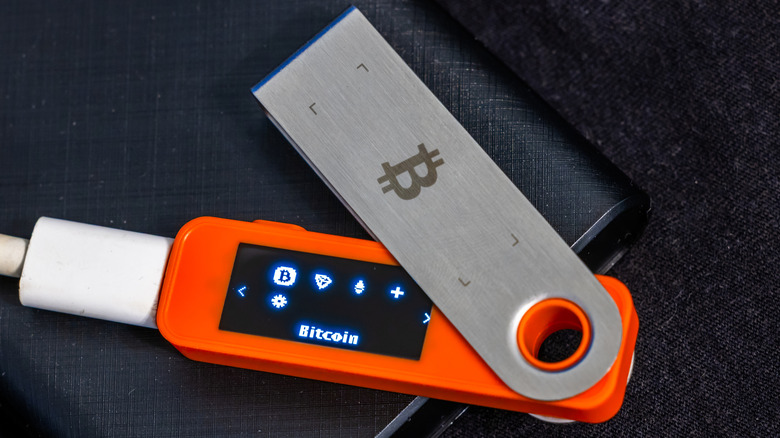
Cryptocurrency security has always been a matter of great debate, especially as high-profile trading platforms have lost customer assets through security breaches over the years. Online communities also commonly chant the mantra of "not your keys, not your coins." Self-custody can be the best way to insulate yourself from third-party risk, but you have to take sole responsibility for securing your holdings. This is why cold wallets have become an attractive option, as they keep your cryptocurrency balance as safe as possible and entirely within your control.
While you can achieve self-custody with a simple wallet app on your phone or computer, a cold wallet is arguably the most secure option. So how do these cold wallets work, what makes them secure and what should you keep in mind before picking one?
What is a cold wallet?
There is one significant difference between hot and cold wallets. A hot wallet lives on a device that can be connected to the internet, while a cold wallet stays offline. The cold wallet's isolation keeps your private keys away from malicious attackers, which in turn, improves the overall security of any cryptocurrency you own.
But before getting too deep into why hot and cold wallets matter, it's worth exploring what a cryptocurrency wallet does. Despite their name, cryptocurrency wallets don't actually hold any of your funds within them. Instead, it's best to think of any cryptocurrency you own as a balance recorded on a blockchain network, like Bitcoin or Ethereum. Your wallet simply holds the cryptographic keys necessary to prove ownership over your balance, similar to an online bank account you'd sign into to manage your money.
A paper wallet is the most basic kind of cryptocurrency, as it's just a physical piece of paper. It includes the private keys that allow you to access your cryptocurrency on the blockchain, commonly represented as a list of 12 or 24 words. However, you must still use an app or program to authorize transactions through a process called signing.
Many modern wallets are primarily designed around convenience. Software wallets like smartphone or desktop apps offer the most assistance, allowing you to sign transactions from anywhere. Hardware wallets, on the other hand, keep your private keys isolated on a dedicated device. You'll still use an app to initiate transactions, but the signing process takes place entirely on the dedicated hardware. This is why you typically need to connect a hardware wallet to your phone or computer via USB, Bluetooth or NFC.
How does a cold wallet work?
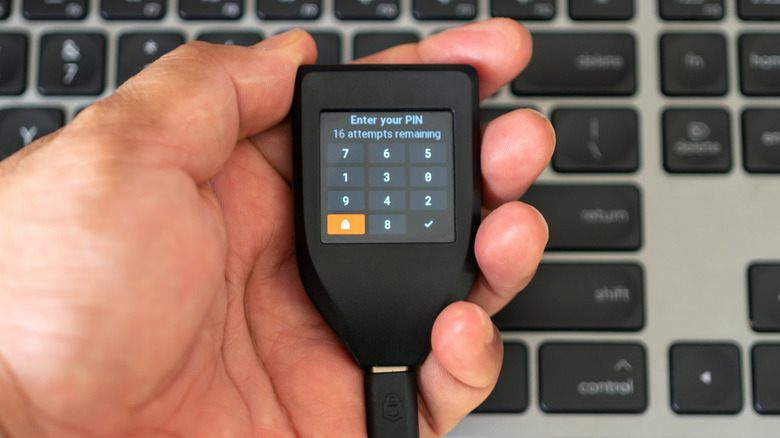
Modern hardware wallets are designed to make their private keys as difficult to extract as possible, using tamper-resistant chips and other security features. These wallets never reveal your private keys to a connected device, so your balance remains safe even if the app you use to initiate transactions on your phone or computer has been compromised.
In practical terms, the hardware wallet's companion app can only send the information needed to sign a transaction, like the amount and destination. These details are displayed on the device's own screen, and the final signing requires you to manually confirm the transaction. If approved, the signed transaction data is sent to the companion app, which then transmits it to the blockchain network.
This separation is what makes a hardware wallet "cold" in nature. Your private key remains isolated from the internet, where malware cannot siphon it behind your back. Even with physical access to the companion app through your phone, an attacker simply cannot initiate transactions. And if the cold wallet itself lands in their hands, these devices typically require a PIN to unlock and will only allow a few incorrect attempts before wiping the storage clean.
This cold storage concept isn't unique to hardware wallets. Your smartphone has a similar tamper-resistant, encrypted chip that requires your PIN to unlock. Apple calls this the Secure Element. However, this chip, which saw expanded usability when Apple opened up NFC to third-party developers in iOS 18.1, is only used to store certain sensitive data like your biometrics and Apple Pay transactions. Hardware wallets introduce another layer of separation by keeping the keys off your phone entirely. However, this doesn't mean they're immune to attacks.
Are cold wallets truly safe?
A hardware or software design flaw can make cold wallets vulnerable to attacks. Take the Coldcard exploit discovered in July 2026 that resulted in attackers siphoning thousands of Bitcoin from unsuspecting users. A software bug dating back to 2021 caused some Coldcard devices to generate weak or predictable private keys rather than incorporating true randomness. Creating a unique set of keys is the first step to setting up any wallet, and randomness makes it impossible to guess.
Unfortunately, the software bug meant that attackers could simply comb through the known list of potential wallets created by Coldcard users. Even though the wallets remained cold and isolated from the internet, the attackers could initiate transactions remotely and drain them. Users scrambled to update their devices, create new wallets with truly random private keys and transfer their assets over before the attackers could. Ultimately, thousands of wallets were emptied.
The moral of the story is that no cold wallet is entirely impenetrable. Companies like Trezor or Ledger that publish their code publicly are popular in the cryptocurrency community, but you should still exercise caution. The easiest security measure is to add a passphrase, which locks your wallet behind a password that you provide and nobody else knows.
Generally, you should also keep a backup of your private keys safely written down. Every hardware wallet offers a way to export your keys in the form of 12 or 24 words. You should never store your backup electronically on your phone or computer, as it defeats the purpose of a cold wallet. Some people etch their backup words onto fire-resistant steel, but you can just use a piece of paper too.